Skip to content
View in the app

A better way to browse. Learn more.

GamingCR

A full-screen app on your home screen with push notifications, badges and more.

To install this app on iOS and iPadOS
  1. Tap the Share icon in Safari
  2. Scroll the menu and tap Add to Home Screen.
  3. Tap Add in the top-right corner.
To install this app on Android
  1. Tap the 3-dot menu (⋮) in the top-right corner of the browser.
  2. Tap Add to Home screen or Install app.
  3. Confirm by tapping Install.

gruposka

Miembros
  • Joined

  • Last visited

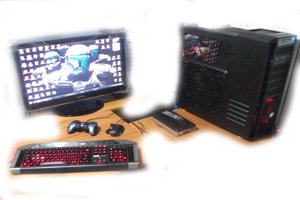
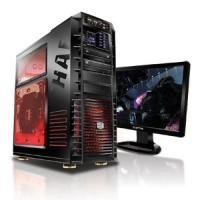
  1. Buenas Compañeros .... Se vende junto o por separado Tarjeta Madre: EVGA X58 3x SLI Procesador: Intel Core i7 920 2.66ghz Memoria: 6GB DDR3 OCZ Precio del Combo: 250000 Tarjeta de Video: EVGA GTX 285 1GB + Conector Dvi-Hdmi Precio: 95000 Case: CoolerMaster HAF 932 Advanced Full Tower + 2 Fan Leds CoolerMaster Precio: 100000 Disco Duro: 3.5 Teras (1 de 1.50 Teras y 1 de 2 Teras )WD Con Bastante Respaldo Precio: 1.5: 45000 y el 2: 50000 Fuente de Poder Rocketfish 1000W Modular Precio: 50000 Keyboard Saitek Cyborg Modelo: KU-0728 (Un poco despintada las letra "D" ) Mouse Cyborg R.A.T. 5 Precio: 50000 Monitor TV Samsung Full HD 1080P 27" P2770HD + Control + Soporte Pared Precio: 180000 Todo con muy poco uso y espero sugerencias y ofertas .....Pura Vida
Account

Navigation

Search

Search

Configure browser push notifications

Chrome (Android)
  1. Tap the lock icon next to the address bar.
  2. Tap Permissions → Notifications.
  3. Adjust your preference.
Chrome (Desktop)
  1. Click the padlock icon in the address bar.
  2. Select Site settings.
  3. Find Notifications and adjust your preference.