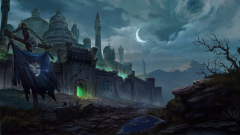
Captura oficial de Forsaken Kingdom (Reino de Renegados), la campaña de Warcraft III: Reforged que explora la caída de Lordaeron y el surgimiento de los Renegados. Parte de la cobertura de GamingCR sobre BlizzCon 2026.
You can post now and register later.
If you have an account, sign in now to post with your account.
Note: Your post will require moderator approval before it will be visible.


.png.0a932fe095aead12b8ce02cef73ef463.png "Warcraft III: Reforged – Forsaken Kingdom | Captura oficial")


.png.3839f86d967a8878aaa12fc90636eeaf.png)
.png.dc417c38c1e30cfc895f7971c15e4862.png)
.png.0aeccc5bc776be99a6335f5ee8160739.png)
.png.d427521b7e6e685026db3a53deab32a7.png)
.png.9dbcc207e0b9a899091429da84663d6d.png)

