


-
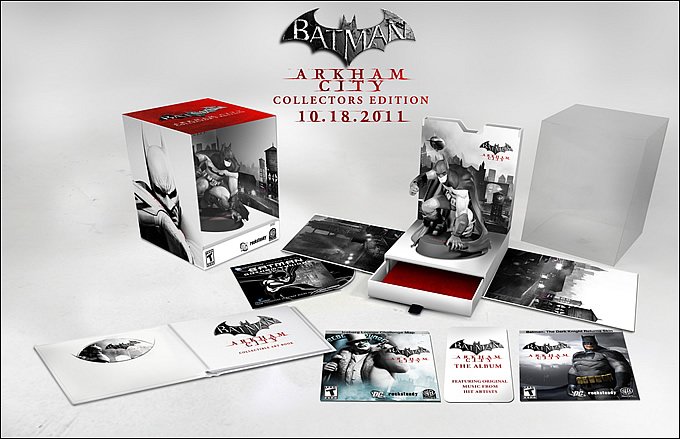
Warner Bros. ha anunciado la edición de coleccionista de Arkham City. Esta incluye:
- Estatua personalizada de Batman producida por Kotobukiya.
- Libro de arte de colección.
- Acceso anticipado al mapa Iceberg Lounge Challenge y al skin Batman: The Dark Knight Returns.
- Album Batman: Arkham City de WaterTower Music incluyendo canciones originales de varios artistias, disponible a través de descarga digital.
- Bonus: película animada original de DC Universe, Batman: Gotham Knight (Precuela animada de la película de Nolan: The Dark Knight).
- Estatua personalizada de Batman producida por Kotobukiya.
- 07/19/2011
Warner Bros. ha anunciado la edición de coleccionista de Arkham City. Esta incluye:
- Estatua personalizada de Batman producida por Kotobukiya.
- Libro de arte de colección.
- Acceso anticipado al mapa Iceberg Lounge Challenge y al skin Batman: The Dark Knight Returns.
- Album Batman: Arkham City de WaterTower Music incluyendo canciones originales de varios artistias, disponible a través de descarga digital.
- Bonus: película animada original de DC Universe, Batman: Gotham Knight (Precuela animada de la película de Nolan: The Dark Knight).
Recommended Comments
Join the conversation
You can post now and register later. If you have an account, sign in now to post with your account.