
Skip to content
View in the app

A better way to browse. Learn more.

GamingCR

A full-screen app on your home screen with push notifications, badges and more.

To install this app on iOS and iPadOS
  1. Tap the Share icon in Safari
  2. Scroll the menu and tap Add to Home Screen.
  3. Tap Add in the top-right corner.
To install this app on Android
  1. Tap the 3-dot menu (⋮) in the top-right corner of the browser.
  2. Tap Add to Home screen or Install app.
  3. Confirm by tapping Install.

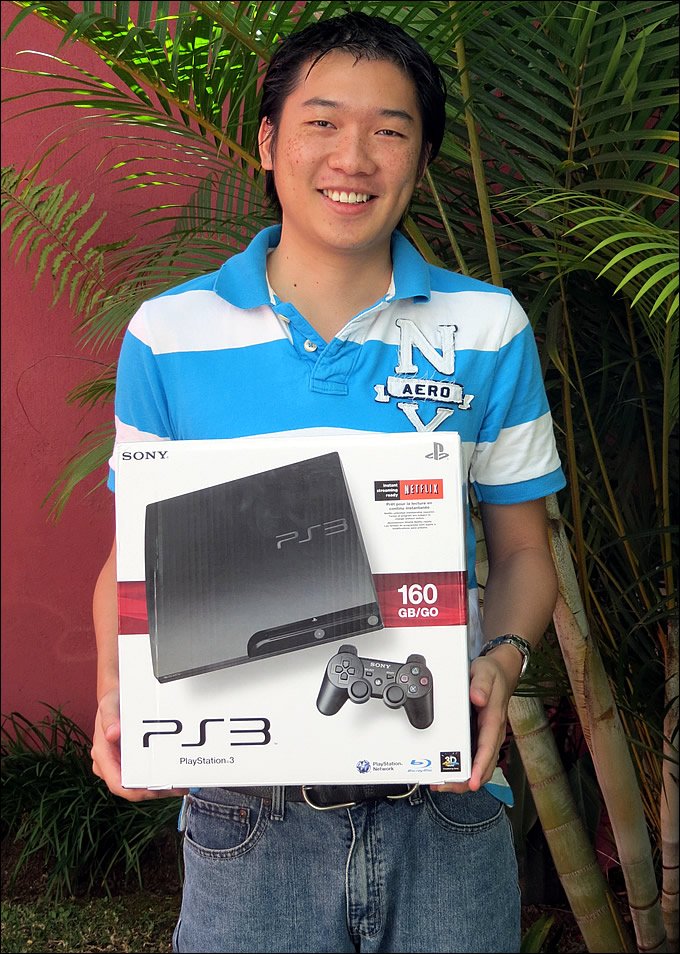
Felicidades xG.Dark :: ¡Ganador de un PS3!

  • xg_dark_ps3.jpg

    ¡Y se pudo! Dark hizo una pausa a sus múltiples viajes internacionales, viajes a la playa y actividades sociales y nos hizo un campito para entregarle un flamante PS3 nuevo de paquete que se ganó gracias a la rifa realizada hace poco en el sitio.

    ¡Que le aproveche!

  • 12/31/2011

xg_dark_ps3.jpg

¡Y se pudo! Dark hizo una pausa a sus múltiples viajes internacionales, viajes a la playa y actividades sociales y nos hizo un campito para entregarle un flamante PS3 nuevo de paquete que se ganó gracias a la rifa realizada hace poco en el sitio.

¡Que le aproveche!

User Feedback

Recommended Comments

dashiz

Miembros

gratz!

xG.SGT

Staff

para q lo deje en la casa de orotina de beg!

Areku

Miembros

MIerda yo nunca me he ganado nada aqui :(

Join the conversation

You can post now and register later. If you have an account, sign in now to post with your account.

Guest
Add a comment...

Account

Navigation

Search

Search

Configure browser push notifications

Chrome (Android)
  1. Tap the lock icon next to the address bar.
  2. Tap Permissions → Notifications.
  3. Adjust your preference.
Chrome (Desktop)
  1. Click the padlock icon in the address bar.
  2. Select Site settings.
  3. Find Notifications and adjust your preference.