
Skip to content
View in the app

A better way to browse. Learn more.

GamingCR

A full-screen app on your home screen with push notifications, badges and more.

To install this app on iOS and iPadOS
  1. Tap the Share icon in Safari
  2. Scroll the menu and tap Add to Home Screen.
  3. Tap Add in the top-right corner.
To install this app on Android
  1. Tap the 3-dot menu (⋮) in the top-right corner of the browser.
  2. Tap Add to Home screen or Install app.
  3. Confirm by tapping Install.

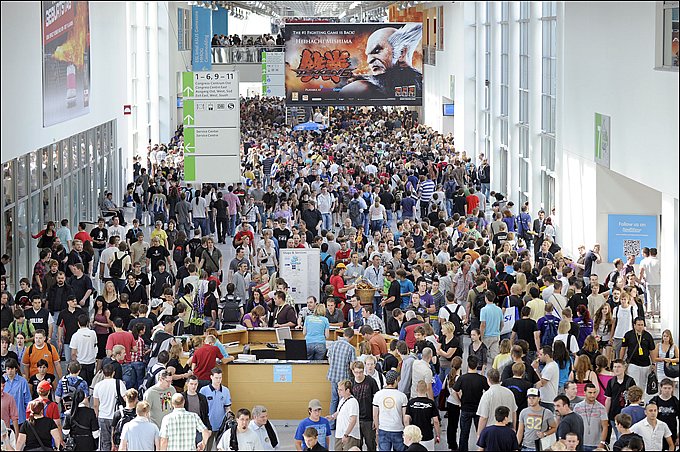
Diablo III, StarCraft II: Heart Of The Swarm se podrán jugar en Gamescom

  • gamescom2011.jpg

    Blizzard ha anunciado que Diablo III y StarCraft II: Heart of the Swarm se podrán jugar en Gamescom 2011, ha realizarse en Colonia. Este será el debut de un demo jugable de Heart of the Swarm, la segunda entrega en la trilogía de StarCraft II.

  • 07/07/2011

gamescom2011.jpg

Blizzard ha anunciado que Diablo III y StarCraft II: Heart of the Swarm se podrán jugar en Gamescom 2011, ha realizarse en Colonia. Este será el debut de un demo jugable de Heart of the Swarm, la segunda entrega en la trilogía de StarCraft II.

"Hemos preparado para ustedes, no sólo partidos de exhibición, raids en vivo, concursos y otras atracciones, pero

también tres grandes juegos, que cada visitante será capaz de jugar."

Gamescom inicia el 18 de agosto y se extenderá hasta el domingo 21 de agosto. Seguramente habrá anuncios muy llamativos previos y durante el evento.

User Feedback

Recommended Comments

Metallan

Miembros

Ve vos... uno creería que los maes se iban a guardar eso hasta el Blizzcon 0p

McRingeril

Miembros

Q buena nota!!! Pero q esperan para sacar Diablo 3? Saquenlo ya!!! Lo necesitamos!!!! Plzzzzzzzzzzzzzzzzzzzzzzzzzzzzzzzzzzzzzz XD

Join the conversation

You can post now and register later. If you have an account, sign in now to post with your account.

Guest
Add a comment...

Account

Navigation

Search

Search

Configure browser push notifications

Chrome (Android)
  1. Tap the lock icon next to the address bar.
  2. Tap Permissions → Notifications.
  3. Adjust your preference.
Chrome (Desktop)
  1. Click the padlock icon in the address bar.
  2. Select Site settings.
  3. Find Notifications and adjust your preference.