
Skip to content
View in the app

A better way to browse. Learn more.

GamingCR

A full-screen app on your home screen with push notifications, badges and more.

To install this app on iOS and iPadOS
  1. Tap the Share icon in Safari
  2. Scroll the menu and tap Add to Home Screen.
  3. Tap Add in the top-right corner.
To install this app on Android
  1. Tap the 3-dot menu (⋮) in the top-right corner of the browser.
  2. Tap Add to Home screen or Install app.
  3. Confirm by tapping Install.

BarCraft :: Extreme Tech se une como patrocinador

Ya lo habíamos comentado en el anuncio oficial del BarCraft que íbamos a realizar rifas. Pues Extreme Tech, es decir Darth Charlie, va a patrocinar la rifa de varios de estos excelentes mouse pads:
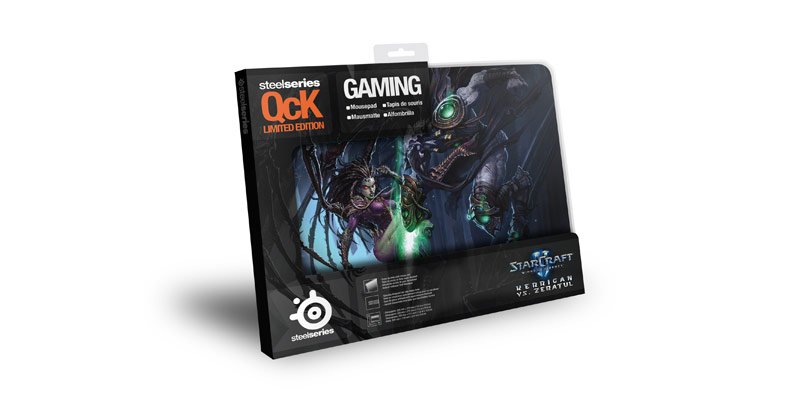
starcraft_ii_mousepad_01.jpg

La metodología de la rifa es muy sencilla. Se apuntan cuando llegan al BarCraft en una lista. Al finalizar las finales de la MLG se extrae el nombre de los ganadores. Si están ahí se lo llevan, si no están, se vuelve a rifar.

Muchas gracias a Extreme Tech y Darh Charlie por su apoyo y esperamos verlos el 20 de Mayo en Hooter's San Pedro, a partir de las 2:00 PM.

GG.

Ver.gifVer: BarCraft: Anuncio Oficial

User Feedback

Recommended Comments

madestro

Miembros

D'oh !! Lastima que ya tengo ese pad. Sin embargo excelente la iniciativa y muy recomendado el pad sobre todo para mouse opticos, pero yo lo uso con un Steelseries Sensei e igual funciona de maravilla.

LΞLLΞ

Miembros

Yo tengo el Rzer Destructor pero este me gusta mucho mas-si tan solo me lo ganara : / hihihi

DarthCharlie

Extreme Technology
(edited)

Muchas gracias a Extreme Tech y Darh Charlie por su apoyo y esperamos verlos el 20 de Mayo en Hooter's San Pedro, a partir de las 2:00 PM.

Ver.gifVer: BarCraft: Anuncio Oficial

Click here to view the noticia

Mas bien gracias a Sky y la organización de GamingCR por crear eventos de este tipo. Esperamos poder verlos a todos y que tengan la oportunidad de ganarse uno de estos MousePads.

Edited by DarthCharlie

Areku

Miembros

Exelente! y gracias a DarthCharlie por el apoyo y a Gamingcr por hacer esto posible :)

Join the conversation

You can post now and register later. If you have an account, sign in now to post with your account.

Guest
Add a comment...

Account

Navigation

Search

Search

Configure browser push notifications

Chrome (Android)
  1. Tap the lock icon next to the address bar.
  2. Tap Permissions → Notifications.
  3. Adjust your preference.
Chrome (Desktop)
  1. Click the padlock icon in the address bar.
  2. Select Site settings.
  3. Find Notifications and adjust your preference.