

Men Upset With McHammed's Threaten To Bomb

By Guest
· 371 views
Hillbilly Town, TX, US.
A statewide alert remained in effect in Texas Friday for two men accused of threatening to blow up the Pentagon.
Hillbilly Town authorities and officials with the FBI and the Texas Department of Public Safety said a man in his 50s and a man in his 40s were apparently upset with the food and service at a McHammed's restaurant in Hillbilly Town, Texas, at about 2 p.m. Thursday when they made the alleged threats.
The manager notified Hillbilly Town police about the threats, which prompted authorities to issue the statewide alert.
"<i>Two gentlemen made threats toward blowing up McHammed's and also blowing up the Pentagon. By the time officials arrived, the men had already fled the scene. We immediately contacted the FBI, who is conducting the investigation at this point</i>" Hillbilly Town Sheriff Department intern, Billy "Crosseyed" Coleman said.
Officials said the men left the restaurant in a white 1996 Ford van.
The FBI said the men had "<i>weird</i>" accent.
Anyone who has any information on the vehicle or the men is asked to contact the Hillbilly Town Police Department at (666) 515-0009.
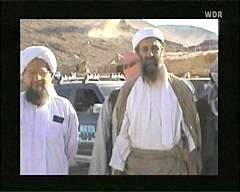
<center><img src="http://www.arbeiterfotografie.com/galerie/kein-krieg/hintergrund/rezension/2004-02-16-0036.jpg"><h5>Picture of a McHammed's security camera from the two men</h5></center>
Recommended Comments