
Skip to content
View in the app

A better way to browse. Learn more.

GamingCR

A full-screen app on your home screen with push notifications, badges and more.

To install this app on iOS and iPadOS
  1. Tap the Share icon in Safari
  2. Scroll the menu and tap Add to Home Screen.
  3. Tap Add in the top-right corner.
To install this app on Android
  1. Tap the 3-dot menu (⋮) in the top-right corner of the browser.
  2. Tap Add to Home screen or Install app.
  3. Confirm by tapping Install.

Upgrade de mi Home Server

(0 reviews)

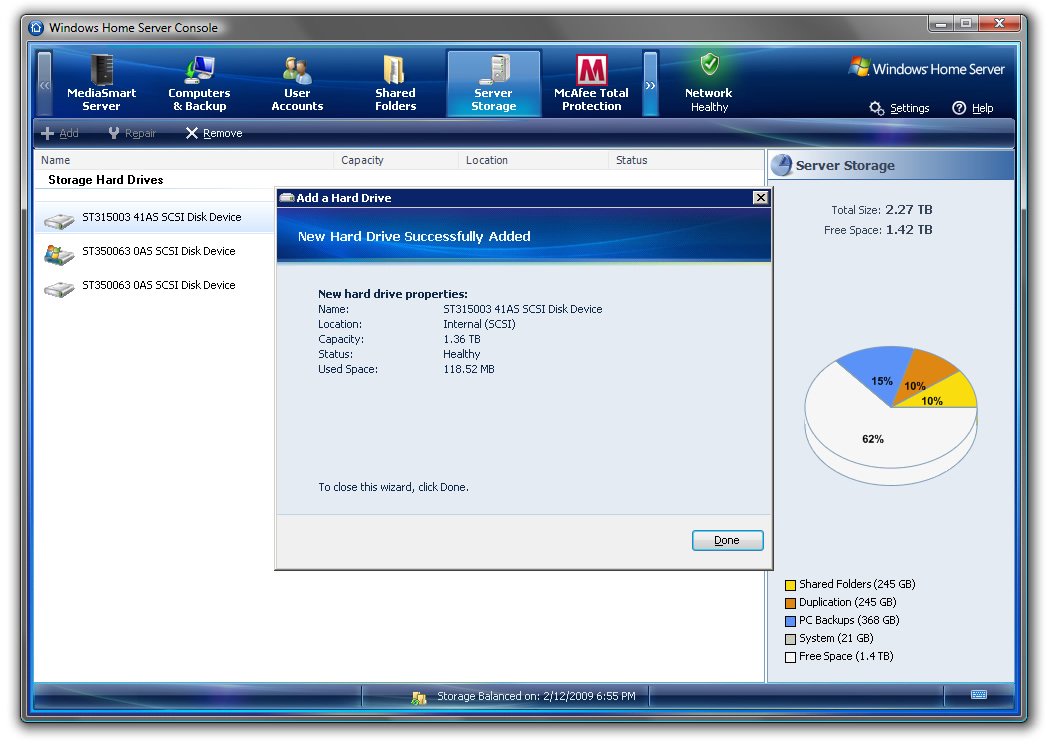
Recientemente hice un upgrade a mi Home Server. Gracias a Seagate adquirí este disco duro. 1.5TB adicionales eran necesarios para la capacidad actual que sólo le restaba 5% para llenarse.
med_gallery_2_19_87534.jpg

El proceso de agregar un disco duro adicional es muy simple, sin requerir siquiera herramientas. El Home Server permite agregar el disco como espacio adicional o como espacio para respaldo de la información actual. Por supuesto lo adicioné como espacio de adicional de almacenamiento.

med_gallery_2_19_111569.jpg

El resultado final, 2.27TB de capacidad a disposición.

0 Comments

Recommended Comments

There are no comments to display.

Guest
Add a comment...

Account

Navigation

Search

Search

Configure browser push notifications

Chrome (Android)
  1. Tap the lock icon next to the address bar.
  2. Tap Permissions → Notifications.
  3. Adjust your preference.
Chrome (Desktop)
  1. Click the padlock icon in the address bar.
  2. Select Site settings.
  3. Find Notifications and adjust your preference.